About Capabilities Workflow Docs Get Started
Action-Oriented AI Assistant

Not Just Chat Get Things Done

Koda doesn't just talk, it acts. From copywriting to coding, from analysis to execution,
delivering verifiable results where every action is backed by evidence.

0
Core Capabilities
0
Collaboration Modes
0
% Verifiable
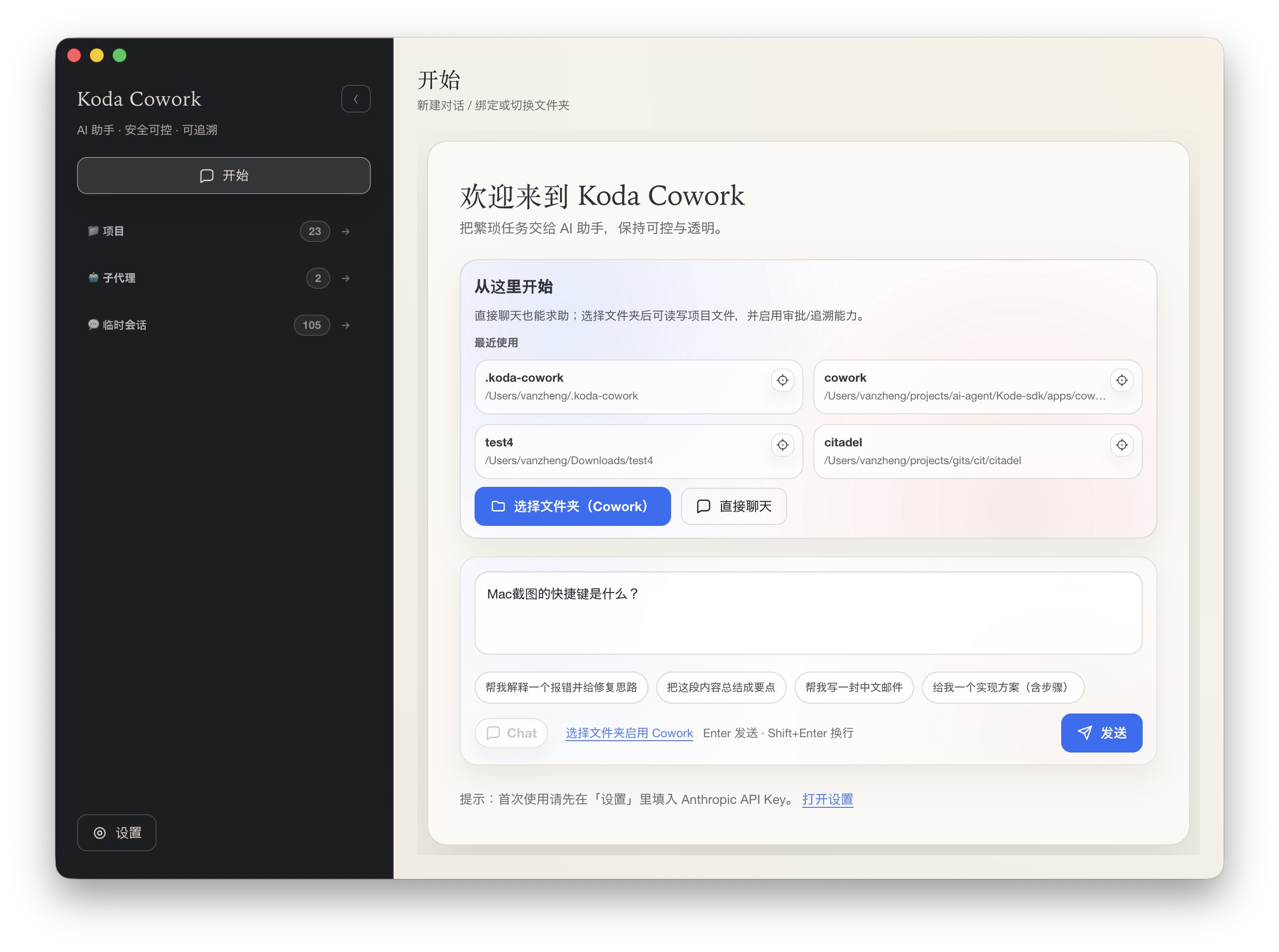
Koda Workspace
Scroll Down
01

About Koda

Not just another chatty AI, but a partner that helps you get things done

Koda is an action-oriented personal assistant that doesn't just respond to your questions, but actually produces verifiable results: files, commands, links, checklists.

Unlike other AI assistants that only "seem to complete" tasks, Koda prioritizes using available tools and Skills, advancing based on real evidence, and being upfront when uncertain—avoiding any false sense of completion.

Once you authorize, Koda enters strong execution mode: first explaining which files/actions will be changed, then proceeding with continuous updates on verifiable deliverables. Risky operations go through approval processes—transparent and controllable.

Action-Oriented
Gets Things Done
Verifiable
Real Results
24/7
Always Ready

Strong Execution

Not just giving advice, but producing verifiable results. Files, commands, links, checklists—every action backed by evidence.

Verifiable

Advancing based on tools and evidence, not "seems reasonable." When uncertain, says so directly—avoiding false completion.

Respects Boundaries

Only operates within your project directory, never overstepping or making decisions without approval. Risky operations are explained first, then wait for confirmation.

Continuous Optimization

Every execution comes with change explanations that can be rolled back. If it can run, it runs—supporting conclusions with actual results.

02

What I Can Do

From daily tasks to engineering delivery, covering core aspects of your workflow

Writing Communication

Communication Copy

Emails, official accounts, reports, speeches. Platform-appropriate and ready to use.

  • Business emails
  • Official account formatting
  • Meeting minutes
  • Speeches
Analysis Visualization

Data Analysis

Statistical analysis, visualization, insight extraction. From CSV/Excel to conclusions.

  • Statistical analysis
  • Chart generation
  • Trend analysis
  • Predictive modeling
Development Refactoring

Code & Engineering

Feature development, bug fixes, architecture design. Production-grade standards.

  • Full-stack development
  • Code review
  • Architecture design
  • Performance optimization
Decision Analysis

Decision Support

SWOT, cost-benefit, risk assessment. Use frameworks to clarify thinking.

  • SWOT analysis
  • Cost-benefit analysis
  • Risk assessment
  • Multi-criteria decision
Research Organization

Research Organization

Literature search, information synthesis, knowledge base building.

  • Literature search
  • Information filtering
  • Knowledge graphs
  • Report generation
Management Efficiency

Planning & Follow-up

Meeting minutes, to-do lists, project scheduling.

  • Project management
  • Time management
  • Progress tracking
  • Risk alerts
03

How to Collaborate With Me

Two modes for different scenarios

Chat Mode

Advice & Reasoning

Suitable for scenarios without a bound project directory. Focuses on suggestions, drafts, reasoning, and planning.

Communication copy optimization
Decision framework analysis
Learning & research organization
Brainstorming & ideation
Typical Scenarios

"Help me write an email"

"Analyze this decision"

"Give me a learning path"

Cowork Mode

Strong Execution

After binding a project directory, can read/write files, run commands, and produce verifiable results within the project.

Code development & refactoring
Data analysis & visualization
Document generation & formatting
Automation scripts & tools
Typical Scenarios

"Implement this feature"

"Analyze this data"

"Generate this report"

Collaboration Process

01

Align Goals

One sentence to explain what to do

02

Execute

Continuously produce verifiable results

03

Verify Delivery

Files/commands/screenshots/links

04

Iterate & Optimize

Continuously improve based on feedback

Best Practices

01

Be Clear About Goals

Directly state what you want—it's more efficient than beating around the bush. If unsure, that's fine—I'll ask key questions.

02

Require Verification

For important tasks, have me provide verifiable deliverables: file paths, command outputs, links, etc.

03

Authorize Execution

Say "follow your recommendation" or "just implement it," and I'll enter strong execution mode.

04

Provide Timely Feedback

If not satisfied, say so directly—I'll immediately adjust direction. No need to be polite; results matter most.

Get Started

Ready to get things done?

Currently Available

Koda is currently integrated into supported AI platforms. You can start collaborating through:

  • Interact directly with Koda in supported conversations
  • Bind project directory to enable Cowork mode
  • Use "follow your recommendation" to trigger strong execution

Contact & Collaboration

Have customization needs or technical collaboration interest? Feel free to contact:

We'll reply as soon as possible to explore more possibilities for AI assistants together.